

EA SMTP Server for Windows
Platform:
Windows 2012 - 2025 or later (32bit/x64)
.NET framework 4.5 installed
A Windows SMTP Server as IIS SMTP alternative which supports DKIM, opportunistic TLS, message throttling, accepted domains, multiple receive connectors and send connectors. It is designed as a replacement for IIS SMTP Server to relay email message from Windows Server. Full journal for each email message and customized sender based routing are supported as well.
Download free trial of EA SMTP Server for Windows
Don't hesitate. Try it out now!
EA SMTP Server Architecture
The following diagram shows the relationships among the components in the EA SMTP Server.
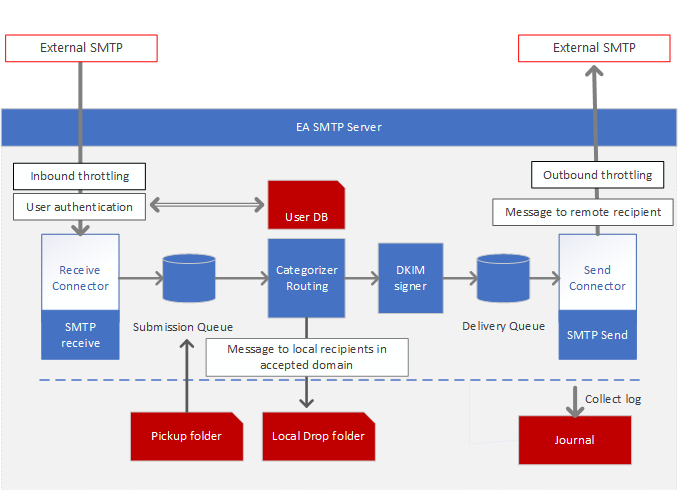
- Receive Connector: Accepts inbound SMTP connections and email messages destined for the local EA SMTP Server.
- Send Connector: Establishes outbound SMTP connections and relays email messages to remote SMTP servers.
- Submission Queue: Temporarily stores inbound email messages before they are processed.
- Categorizer: Categorizes email messages and routes them to either the delivery queue or a local drop folder..
- Delivery Queue: Temporarily stores outbound email messages before they are sent to remote servers.
- DKIM Signer: Adds a DKIM signature to outgoing email messages for authentication.
- Pickup Folder: Picks up RFC 822-compliant email files and sends them to the submission queue..
- Accepted Domains: Controls which domains and recipients the server will accept emails for.
- User DB: Stores user information; only authenticated users can relay messages through the local EA SMTP Server.
- Throttling Control: Control connection rates and message throughput to prevent server overload.
- Journal: Collects and stores email logs in a local database for auditing and troubleshooting.